2012-07-06

Use More Monitor... with Less Mouse Motion

Among the variety of SolidWorks tips that are regularly shared among users, a recent post on the official SolidWorks Blog entitled Stop Mousing Around! is genuinely worthy of recognition and appreciation.  In this post Matthew Lorono (Definition Product Manager at SolidWorks Corp.) shared an overlooked but incredibly effectual feature in Windows that involves... are you ready for this... Mouse Properties.  So why should something so seemingly basic as Mouse Properties garner such attention?

Well, over the years CAD users have embraced the benefits of increased monitor size.  Today many are likewise expanding those benefits by increasing the number of monitors.  Overlooked however, is that many have also steadily increased their mouse (wrist) movements to accommodate these larger spans... unnecessarily.
  
To facilitate adjusting your mouse, Mouse Properties can be accessed in Windows by selecting:
Start > Control Panel > Mouse > Pointer Options.  The Pointer Options page contains a Motion slide bar that ranges from Slow to Fast.  To reduce the amount of wrist motion required to move the mouse pointer, simply increase the speed of the mouse pointer.  It may take only a few iterations before finding a personal setting that yields an agreeable balance between motion and speed.

Yes, this is one of those rare tips that produces immediate and lasting improvement for essentially any CAD user.

2012-05-09

SolidWorks Appearances - Get Real with Pantone Colors

It is one thing to develop an impressive SolidWorks model or assembly, but how much greater an impression a design takes on when it is visually rendered!  As many have found, SolidWorks Appearances is a valuable property that can quickly enhance the visual presentation of models and assemblies when you don't have a pressing need to go full-blown with PhotoWorks or PhotoView 360.  In particular, the use of Color Swatches in the Appearance properties allows for conveniently assigning colors at the part or assembly levels, using either the RGB or HSV color model systems.

(c) Pantone, LLC
Now if you have performed work in the consumer products industry, you have probably gained an awareness that many companies use design language that references the Pantone Color Matching System (PMS).  This is because Pantone has established itself worldwide as a leading color system standard.  A drawback for a SolidWorks user who is trying to use color swatches however, is that to determine the RGB of a Pantone requires that you have access to a Pantone Color Guide. These various Pantone Color Guides provide a direct correlation between a specified Pantone and RGB / HTML / CMYK color models.  The difficulty is that the Color Guides are expensive and who really wants to spend a lot for something that is ... well, for appearances only!  So is there another way to determine the Pantone to RGB correlation?

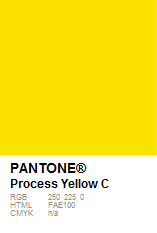
Yes, the Pantone site has an excellent page that while primarily designed for cross referencing Pantones, also provides the associated RGB values as shown in the image.  It just takes a few easy steps to find...
  1. On the Pantone homepage, go to menu item "helpCENTER" and select "Color Cross-Reference" from the drop-down list
  2. On the "myPANTONE x-Ref" section
    • Select your known Pantone Color Guide
    • Select your known Pantone Color
    • Select an X-Ref Pantone Guide (any choice will do)
  3. Click the ZOOM icon located between the color swatches
  4. A new overlay window will open displaying a larger comparison image, and here you will see the RGB, HTML, and CMYK of the Pantone color
So, a very convenient and no-cost method to derive the RGB values of any known Pantone color.  The specified RGB values can now be easily applied to your SolidWorks Color Swatch pallet for creating visually appealing appearances that conform to your clients Pantone color standards!

2012-04-16

SolidWorks World 2012 Presentations now online

The SolidWorks World 2012 Presentations are now available online.  Held in San Diego, California USA during February 12-15, SolidWorks World once again contained a meaningful array of topics relevant to beginner, intermediate or advanced users.

(C) DS SolidWorks
The searchable main Categories include:
  • CAD Administration
  • Customer Success
  • Data Management
  • Design Automation
  • Design Communication
  • Design Validation
  • Education
  • Modeling Essentials
  • Productivity Tools
These online presentations provide an excellent no-cost opportunity to build or enhance your SolidWorks CAD skills throughout the year.

2012-03-03

SolidWorks V6... Someday... Maybe?

The software capability needs among SolidWorks users are as varied as the users themselves, and over the years many of us have grown and developed our CAD skills alongside the development of the software.  If 2011 Dassault Systemes license growth is any indication, then it is still very apparent that SolidWorks continues to provide a valuable CAD package that delivers on a broad range of MCAD applications.

That said, speculation remains as to the direction the software is going.  From the record of SolidWorks World 2012, we should expect a typical release to 2013 and anticipate a next generation option of choice sometime in the future.  Some are relieved.  Others are disappointed, as many have eagerly anticipated the SolidWorks V6 platform as an alternative choice.

Software as a service (SaaS) has been around for a while now, and there are a variety of CAD developers that have tested the waters.  SolidWorks itself has n!Fuze and has no doubt learned much from the foray, but the question still remains... will we ever see SolidWorks V6?   Someday... maybe.  Patience and propriety is not a quality of all, but it does have merits when executing a successful product launch.  Perhaps that is what we are experiencing with regards to SolidWorks V6, where getting it right the first time would be critical to its acceptance and success.

There are certainly many who for very understandable reasons simply could not operate their CAD services without the current on-site software license arrangement.  For such ones, file and software security is mission critical.  For others, CAD files are developed, delivered, and they move on to the next client assignment.  For these, paying for CAD software as a service would be most convenient and cost effective, including the additional benefit of access to the current SolidWorks release every time you went online, free of any need to manage upgrades or service pack releases!

Some years ago the thought of banking and purchasing goods online was just an idea.  When it became a reality, people were legitimately concerned and skeptical about security and accessibility.  After all, very few things are as important as one's personal finances.  In response, the banking industry has shown it is possible to successfully and securely provide transactions involving proprietary information online.  The same skepticism is apparent regarding the SolidWorks V6 platform.  It shouldn't be surprising to know that during the recent SolidWorks World 2012 conference, it was shared that the company is working out how to best bring this option to fruition.  What would be surprising however, is if SolidWorks failed to develop a successful SAS choice... someday... maybe?

2012-02-10

How to Start a CAD Business?

Interest in 'How to Start a CAD Business' is among the variety of subjects regularly searched and viewed on this blog. Therefore to assist further in this regard, please find a brief review and links to four earlier and popular posts that may help in providing direction and encouragement toward starting a CAD business.  We hope you find the information beneficial toward developing your interest, your approach and your potential as a CAD entrepreneur!

First, Are You Considering Starting a CAD Business? discusses three specific options you have for working in the field of CAD.  This post was the very first for this blog and lays the groundwork for considering which direction you might choose to utilize your CAD skills and interest.

Second, Basic Steps to Starting a CAD Business presents four facets that would be essential for establishing a CAD business.  Because any business venture requires a measure of investment of some sort, the information is written from the perspective of starting lean and building later as opportunity affords.

Third, Starting a CAD Business... Surprisingly Easy! provides the elementary requirements to make a CAD business a reality.  Many may be surprised to find that starting a CAD business is not as daunting as they might have thought!

Fourth, Go For It! ...Ways to Generate CAD Business Opportunities encourages an awareness of potential opportunities for CAD work.  While certainly not an inclusive list of ideas, it does bring to attention the two primary types of opportunity that exist.

As many have found, working with SolidWorks can be both enjoyable and rewarding.  It is an incredible 3D CAD software package with some of the finest features and user interface found in the industry.  To grow from a SolidWorks CAD user to a SolidWorks CAD entrepreneur can be a worthwhile endeavor, but as with any secular venture it is important to weigh the cost, as it were.  The reality is that not all business ventures will turn out successful.  However, sincere desire and effort with integrity may well provide the impetus and foundation needed toward starting a CAD business.

With that in mind, please take the time to review the variety of additional posts found throughout our blog archive.  As you will find, the effort behind each is to share topics relevant and practical to fellow SolidWorks CAD entrepreneurs, or those considering to be!

2011-11-09

Build your SolidWorks Toolbox... with free CAD models

SolidWorks Toolbox is a library of standard parts that can be fully integrated with SolidWorks Premium or SolidWorks Professional.  While essential for some SolidWorks users, it is also regarded as complicated and inconvenient by others.  The great divide is due in large part because Toolbox requires installation and configuration.  So is there a way to generate common toolbox-type models and avoid having to build and manage the Toolbox add-ins and configurations?  Apart from Toolbox, what alternatives are available to SolidWorks users for creating standard parts and fasteners?

Today, in addition to SolidWorks 3D ContentCentral, there are a variety of online vendors that readily provide common use CAD models for free.  As these vendors are well aware, this is a service that is provided to drive awareness of their products, and ultimately their sales revenue.  For the SolidWorks user, downloading free CAD files can be a very efficient method of generating these toolbox-type or vendor specific files, thereby averting the Toolbox installation and configuration scenario entirely.

Here is a brief and varied list of some reputable sites providing free CAD models for download:


It would be benefical to have a File Management technique already in mind prior to downloading your files, and after downloading you might also choose to edit the Property fields to your preference.  A practical suggestion is to arrange your SolidWorks Design Library to view and access your new personal Toolbox directly from the Task Pane.  Like many, you too may find that taking advantage of free CAD models will oftentimes save you hours to days of work, while you build a personal SolidWorks Toolbox without the burden of installation or configuration.

2011-10-07

Packaging Design with SolidWorks​?... or The Box Builder

Have you ever considered that SolidWorks can be used for packaging and box design?  While it does lack some of the more intuitive aspects of packaging, the sheet metal feature set contains basic principles that easily translate to packaging design, albeit with some minor setting modifications.  Having developed several box designs utilizing SolidWorks, it is apparent that merging product design with packaging design is a natural fit in the product-to-market flow.  I have mentioned to SolidWorks Corporation on several opportunities that developing a packaging application similar to sheet metal would make for an interesting facet of the software and could potentially further extend and bridge SolidWorks into packaging engineering departments.

(C) The Box Builder
Recently we have seen SolidWorks enter the foray of cloud applications with n!Fuze.  However, while it does seem that SolidWorks is looking further into cloud based opportunities, we probably won't see anything dramatically pushed out that could potentially upset the current customer base.  In the meantime as Dassault Systemes continues to expend energy promoting 2D DraftSight, other companies are taking advantage of the apparent 3D CAD attention deficit gap.  With a dedicated focus on 3D structural packaging design The Box Builder is a company that has embraced structural packaging CAD with an eye firmly on the cloud.

Based in Asteasu, Guipúzcoa, Spain, The Box Builder team has developed an incredibly easy-to-use online 3D CAD solution utilizing ModelMaker that combines design quality, a versatile library, and a user-friendly interface that doesn't require prior training.  Developed on ASP (Application Service Provider) cloud hosting technology, you do not have to buy the application, but rather you buy the right to use it through weekly, monthly or annual licenses.  This makes for an ideal arrangement in many ways.

The benefits range from those who might need it solely for short-term contract work, to a company simply desiring to free itself of IT dependent software setup and support (routinely needed with traditional in-house workstation or server licensed software), to anywhere in between.  Designs are able to be exported on common formats (CF2, PDF, EPS or DXF), and the designs are securely and confidentially saved within user arranged folders so that they can be recovered, used and redesigned as often as desired.  With direct savings in Total Cost of Ownership (TCO) and gains in Return on Investment (ROI), The Box Builder might well be the best choice for online structural packaging design currently on the market!